
Edge Caching vs Object Caching vs Opcode: What Each Fixes (and Doesn’t)
When a WordPress site feels slow, “caching” is usually the first thing everyone blames—and for good reason. But not all caches are equal.
I often see site owners enabling every caching option in W3 Total Cache or WP Rocket, hoping for a miracle. Instead, they get conflicts, stale cart data, and a site that is slower than before.
In reality, Edge Caching, Object Caching, and Opcode Caching each solve a completely different bottleneck in the server stack. Mixing them up leads to wasted effort.
In this deep dive, we’ll demystify what each type of caching does, where it operates physically, and how to combine them into a unified Performance Stack that actually works.
What “Caching” Really Means in WordPress
In its simplest form, caching stores pre-computed data so it doesn’t need to be generated again. The key difference is where in the infrastructure stack this happens:
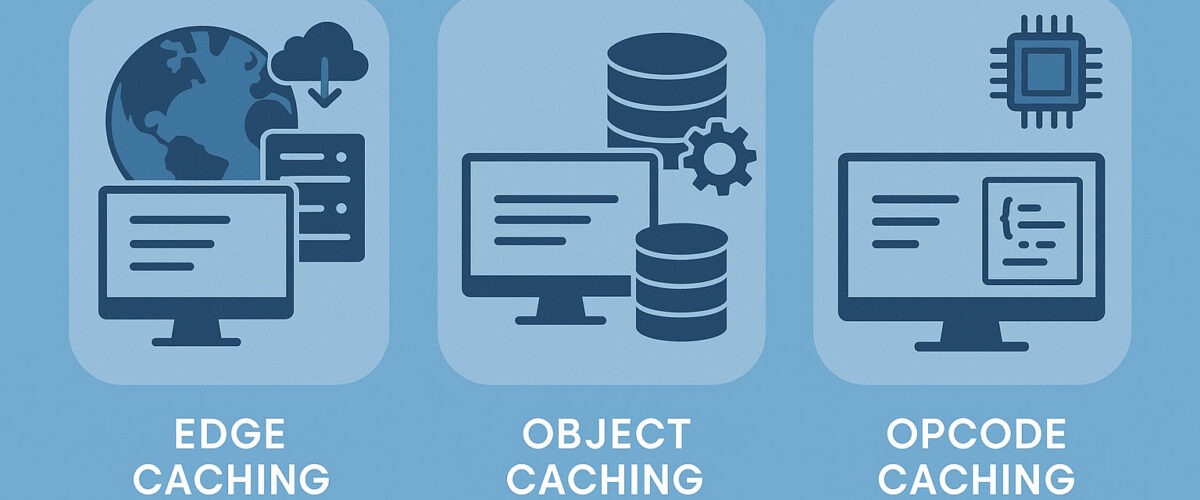
- Edge Caching: Happens at the CDN layer (closest to the visitor).
- Object Caching: Happens in the Database layer (via Redis or Memcached).
- Opcode Caching: Happens in the PHP Engine (inside your server’s RAM).
Each type targets a specific slowdown: network latency, database query load, or PHP code execution. Let’s unpack each.
1. Edge Caching: Speed at the Network Level
The Bottleneck: Latency (Distance).
The Fix: Serving static HTML from a server in the user’s city, not your data center.
Edge caching stores your website’s full HTML output and assets (CSS, JS, Images) on CDN servers around the world (e.g., Cloudflare, Fastly, BunnyCDN). When a user in London visits your site hosted in New York, they get the content from a London server.
How It Works
- First Visit: The CDN fetches the page from your origin server (MISS).
- Second Visit: The CDN serves the saved copy directly from the edge node (HIT). The request never touches your origin server.
Pros & Cons
| Pros | Cons |
| Massively reduces TTFB (Time to First Byte). | Stale Data: Updates (like fixing a typo) can take minutes to propagate globally. |
| Offloads CPU: Your server does zero work for cached hits. | Dynamic Conflict: Can accidentally cache a logged-in user bar or shopping cart if not configured with “Bypass Rules.” |
Best Practices
Use a modern solution that supports Smart Purging via API.
- Cloudflare APO: Integrates with WordPress to purge the edge cache instantly when you update a post.
- LiteSpeed (QUIC.cloud): Does the same for LiteSpeed servers.
When to Use It:
If you have a global audience, Edge Caching is mandatory. It is the only way to get a sub-100ms TTFB worldwide.
Check your current global TTFB with our Website Speed Score Analyzer.
2. Object Caching: Speed Inside the Database
The Bottleneck: MySQL Query Load.
The Fix: Storing the results of complex database queries in RAM (Redis).
WordPress is “database heavy.” A simple homepage might require 50+ MySQL queries to fetch the menu, site settings, latest posts, and footer widgets. Object Caching stores the answers to these questions so WordPress doesn’t have to ask MySQL again.
How It Works
- Without Object Cache: WordPress asks MySQL: “Get me the latest 10 posts.” MySQL scans the disk, finds them, and sends them back. (Time: 0.05s).
- With Object Cache (Redis): WordPress asks Redis. Redis replies instantly from memory. (Time: 0.001s).
Real-World Example
We recently audited a WooCommerce store with 100k products.
- Before Redis: The “Filter by Price” query took 2.4 seconds to run.
- After Redis: The same query took 0.03 seconds because the result was served from RAM.
When to Use It
Object Caching is critical for Dynamic Sites:
- WooCommerce Stores
- Membership Sites / Logged-in Users
- Busy WordPress Admins (makes the backend faster)
Note: Object Caching requires a persistent backend like Redis. Check if your host supports this in our Fastest WordPress Hosting Guide.
3. Opcode Caching: Speed at the PHP Level
The Bottleneck: Code Compilation.
The Fix: Saving the compiled machine code of PHP scripts so they don’t have to be re-read from disk.
WordPress is written in PHP, which is an interpreted language. Every time a page loads, the server has to read index.php, wp-config.php, and dozens of plugin files, verify the syntax, and compile them into machine code. OPcache removes this step.
How It Works
- First Request: PHP reads the file, compiles it to “Opcodes,” executes it, and saves the Opcodes to RAM.
- Next Request: PHP skips the file read and compilation, executing the Opcodes directly from RAM.
The Verdict
Enable it everywhere. There is effectively no downside to Opcode caching. It reduces CPU usage by up to 70% on busy sites. Most modern hosts enable Zend OPcache by default.
The “Performance Stack”: How They Work Together
In a well-architected WordPress site, these three layers stack perfectly without conflict.
The Request Flow:
- Visitor Click -> Hits Edge Cache (CDN).
- If HIT: Returns HTML instantly. (Speed: <50ms)
- If MISS: Request goes to Server.
- Server -> PHP starts. Checks Opcode Cache.
- Loads compiled scripts from RAM.
- WordPress Application -> Needs Data. Checks Object Cache (Redis).
- If HIT: Gets data from RAM.
- If MISS: Queries MySQL Database.
- Page Generated -> Sent back to user and saved to Edge Cache.
Configuration Matrix: What to Use When
| Site Type | Edge Cache | Object Cache (Redis) | Opcode Cache |
| Simple Blog | Required | Optional | Required |
| WooCommerce | Careful (Bypass Cart) | Critical | Required |
| Membership Site | Careful (Bypass Login) | Critical | Required |
| Dev / Staging | Disable | Disable | Enable |
Common Pitfalls & Misconceptions
“I have a cache plugin, so I have Object Caching.”
False. Plugins like WP Rocket provide Page Caching (saving HTML to disk). They do not provide Object Caching (saving DB queries to RAM) unless you connect them to a Redis server.
“Redis replaces my CDN.”
No. Redis speeds up the backend (generating the page). The CDN speeds up the delivery (sending the page). You need both.
“Caching fixes my slow code.”
It masks it. If you have a plugin running a terrible query, caching hides the issue for the second visitor, but the first visitor (and your server) still suffers. Always optimize your code first.
For high-traffic sites, caching is only half the battle. You also need to size your server correctly. Read our guide on How Many PHP Workers Do You Need?.
Final Verdict
Think of your caching stack as a three-tier defense system:
- Edge Cache: Stops the request from reaching your server.
- Opcode Cache: Makes the code run faster if it does reach the server.
- Object Cache: Makes the database queries instant.
When tuned together, these layers transform WordPress from sluggish to lightning-fast. Measure, benchmark, and stack them correctly.
Frequently Asked Questions
Yes. They are designed to work in parallel. Just ensure your Edge Cache (Cloudflare) is configured to bypass dynamic pages (Checkout, My Account) so it doesn’t serve cached private data.
Indirectly, yes. Faster sites have better Core Web Vitals (LCP and TTFB), which are ranking factors. Edge Caching is the single most effective way to improve global LCP scores.
For WordPress, yes. Redis supports persistent data structures and is generally more robust for the complex object caching needs of WooCommerce. Most managed WordPress hosts now default to Redis.
You should probably switch hosts. But if you can’t, use a file-based object cache solution (like W3TC Disk Cache), though it is significantly slower than RAM-based Redis.
Only when you deploy code changes, update plugins, or change design elements. “Over-clearing” the cache forces your server to work harder to rebuild it, slowing down your site for users.
please consider sharing!:
More in Hosting

Nice breakdown. One addition: the same caching principle applies to AI coding agents. Prompt caching avoids re-billing the same system prompt on every turn, something many developers overlook until they see their token bill. We rely on a similar pattern.