
What Is HTTP/3 and Why It Makes Sites Faster

HTTP/3 is the latest generation of the web’s transport protocol, designed to reduce latency, smooth out performance on flaky networks, and make pages feel snappier even when everything else in your stack stays the same. In this explainer, I’ll break down what problem HTTP/3 solves, how it works under the hood, how it compares with HTTP/2, and what you actually need to do on your hosting, CDN and WordPress setup to benefit from it.
We’ll look at where HTTP/3 fits into a modern hosting speed stack, how it affects metrics like TTFB and LCP, common misconfigurations that silently disable it, and a practical checklist you can follow to roll it out safely. I’ll draw on real-world experience migrating high-traffic WordPress sites from HTTP/1.1 and HTTP/2, including the edge cases that don’t show up in marketing diagrams.
If you’re at the stage of choosing infrastructure, I’ll also touch on how to evaluate the best WordPress hosts for HTTP/3 support and what questions to ask before you commit.
What Problem Does HTTP/3 Actually Solve?
To understand why HTTP/3 exists, you need to look at where traditional HTTP struggles. Classic HTTP/1.1 and even HTTP/2 ride on top of TCP, a connection-oriented protocol designed decades ago for stable, wired networks. Modern reality is very different:
- Users switch between Wi-Fi and mobile data mid-session.
- Mobile networks drop packets regularly.
- Latency can spike unpredictably, especially across continents.
- Sites serve dozens to hundreds of assets per page.
With HTTP/1.1 and HTTP/2 over TCP:
- Head-of-line blocking means that if one packet is lost, the entire stream of data has to wait while TCP retransmits.
- Connection warm-up (three-way handshake + TLS negotiation) adds multiple round trips before useful data flows.
- IP changes (e.g. moving from 4G to Wi-Fi) often force the connection to be re-established from scratch.
On a fast fibre connection, you may barely notice this overhead. On a mid-range Android phone, on congested mobile networks, these issues translate into sluggish TTFB, janky scrolling as images arrive late, and interactions feeling “sticky”.
HTTP/3, built on QUIC over UDP, tackles these problems directly by:
- Eliminating TCP-level head-of-line blocking.
- Reducing connection setup to as little as one RTT (or even zero in some cases).
- Making connection migration (e.g. IP change) effectively transparent.
The result is not magic instant loading, but a noticeable improvement in consistency and responsiveness, especially for users on the edge of your audience – older devices, noisy Wi-Fi, or physically distant from your origin.
How We Got Here: From HTTP/1.1 to HTTP/3
HTTP has evolved in layers, with each generation solving some problems and revealing others.
HTTP/1.1
- One request per TCP connection.
- Browsers opened multiple connections (typically 6 per domain) to parallelise loading.
- Developers hacked around limitations with sprite sheets, domain sharding and aggressive concatenation.
On high-latency networks, the multiple connection handshakes and packet loss penalties made HTTP/1.1 brittle and slow.
HTTP/2
- Introduced multiplexing multiple streams over a single TCP connection.
- Header compression reduced overhead for repeated headers.
- Server push (now largely discouraged) tried to pre-emptively send assets.
HTTP/2 significantly improved performance, but head-of-line blocking remained because all streams still ran over the same TCP connection. If a packet went missing, all active streams waited on the retransmit, even if most data was fine.
HTTP/3 (QUIC)
- Replaces TCP with QUIC over UDP.
- Each stream is independently flow-controlled, so packet loss only affects that stream.
- TLS is built into QUIC, reducing handshakes and making encryption non-optional.
In practice, HTTP/3 is less about raw top-end speed and more about latency resilience. It keeps your site feeling fast when the network is fighting you. I
To get a comprehensive test of how fast your site is today, check out our website speed score tool.
Conceptual Overview: How HTTP/3 and QUIC Work
At a high level, HTTP/3 is simply “HTTP semantics over the QUIC transport protocol”. Let’s break down the key concepts without drowning in RFCs.
UDP instead of TCP
QUIC runs on UDP, which is connectionless and does not guarantee delivery. QUIC then reintroduces reliability, ordering and congestion control at the protocol level. This sounds redundant until you realise it gives QUIC much finer control over how streams behave when the network is unreliable.
Streams without TCP head-of-line blocking
In QUIC, each HTTP request/response pair is a stream. Streams are:
- Independently flow-controlled.
- Delivered reliably.
- Not blocked by lost packets in other streams.
So if a large image packet goes missing, it does not stall the delivery of your HTML or CSS; the browser can continue parsing and rendering while that single stream is recovered.
Integrated TLS and fewer round trips
With HTTP/2 over TCP, a new connection typically involves:
- TCP three-way handshake.
- TLS handshake.
- HTTP request/response.
HTTP/3 with QUIC integrates TLS, allowing:
- Initial connection establishment with fewer round trips.
- 0-RTT resumption, where repeat visitors can start sending data immediately using cached keys (with some caveats).
Those saved round trips are especially valuable for distant users where each RTT is 100–200 ms or more.
Connection migration
QUIC identifies connections via a connection ID rather than just IP + port. When a user’s IP changes (e.g. Wi-Fi to 5G), QUIC can keep the same logical connection alive, avoiding the cost of tearing down and re-creating TCP connections and TLS sessions. That means fewer stalls during mid-scroll or while playing embedded video.
How HTTP/3 Makes Real Sites Feel Faster
In synthetic tests on perfect networks, HTTP/3 may look only marginally better than HTTP/2. The real gains appear in messy, realistic conditions. From a performance practitioner’s perspective, HTTP/3 influences:
- TTFB (Time to First Byte) – reduced handshake overhead and faster recovery from packet loss improves the time until first response.
- LCP (Largest Contentful Paint) – especially on image-heavy pages where large assets no longer block the rest of the page when they encounter packet loss.
- INP (Interaction to Next Paint) – smoother data delivery reduces “jank” when the browser fetches additional assets or API calls as the user interacts.
On WordPress sites with optimised caching and a decent CDN, HTTP/3 often shows up as:
- Higher performance percentiles for users on slower mobile networks.
- Reduced variance in page load times – fewer “outlier” slow loads.
- Better scores in real-user monitoring (RUM) tools, particularly p75 metrics.
However, HTTP/3 is not a substitute for sensible architecture. If your origin is overloaded, your database queries are unindexed, or your theme ships 4 MB of JavaScript, HTTP/3 will not save you. It’s one layer in a broader performance strategy, which should be mapped out as part of your WordPress speed stack planning.
HTTP/3 vs HTTP/2 vs HTTP/1.1: At-a-Glance Comparison
| Feature | HTTP/1.1 | HTTP/2 | HTTP/3 |
|---|---|---|---|
| Transport protocol | TCP | TCP | QUIC over UDP |
| Multiplexing | No (one request per connection) | Yes (multiple streams per TCP connection) | Yes (multiple streams without TCP HoL blocking) |
| Head-of-line blocking | Severe | Present (TCP-level) | Minimised (stream-level only) |
| TLS integration | Optional, separate (HTTPS) | Required for browsers | Built into QUIC |
| Connection setup latency | Higher (TCP + TLS) | Moderate (optimised TLS) | Lower (fewer RTTs, 0-RTT possible) |
| Resilience to IP change | Weak | Weak | Strong (connection migration) |
| Browser support | Universal | Universal on modern browsers | Supported in all major modern browsers |
| Best use case | Legacy systems | Current baseline | Modern performance, mobile-heavy audiences |
Pros and Cons of Adopting HTTP/3
HTTP/3 Advantages
- Better performance on real-world networks – less brittle when users have high latency or intermittent packet loss.
- Improved mobile experience – connection migration and reduced handshake overhead particularly benefit mobile-heavy traffic.
- Simpler long-term evolution – QUIC is designed to be more easily extended and improved than TCP.
- Encrypted by default – TLS is integrated; there’s no non-secure variant to misconfigure.
HTTP/3 Drawbacks and Limitations
- Operational visibility – QUIC/HTTP/3 traffic can be harder to inspect with legacy tools that assume TCP.
- Firewall and middlebox compatibility – older network equipment may interfere with UDP-based traffic.
- Server and CDN maturity – implementation quality still varies; you want battle-tested stacks rather than experimental builds.
- Marginal gains on perfect networks – on local, low-latency testing, the difference may be small; benefits show up in your global, real-user data.
Where HTTP/3 Fits in Your WordPress Speed Stack
When you think about a modern performance architecture, HTTP/3 is one of several layers:
- Fast, well-tuned PHP and database layer.
- Smart caching (page cache, object cache, opcode cache).
- Optimised assets (compressed images, minimal JS, critical CSS).
- A capable CDN to bring content closer to users.
- Modern protocol support – HTTP/2 as baseline, HTTP/3 where available.
In almost every WordPress stack I’ve tuned, HTTP/3 is a “multiplier” on good fundamentals rather than a replacement for them. That’s why it’s best evaluated alongside choices of hosting, CDN, and caching strategy, not in isolation. If you’re planning a full stack review, align your protocol decisions with the guidance in your broader hosting speed stack reference.
How to Check If Your Site Already Uses HTTP/3
Before making changes, you need to know your baseline. There are several practical ways to check for HTTP/3 support.
Using browser developer tools
- Open your site in Chrome or Edge.
- Open DevTools (F12 or right click → Inspect).
- Go to the “Network” tab and reload the page.
- Right click on the column headers and enable the “Protocol” column.
- Check what the main document and key assets report – h2, h3, http/1.1, etc.
If you see h3 in the protocol column for the main document or key CDN-served assets, HTTP/3 is active.
Using command line tools
Tools like curl and nghttp can also test HTTP/3 support, provided they’re built with HTTP/3 libraries:
curl -I --http3 https://yourdomain.com/If the request succeeds and reports HTTP/3, you have at least basic support at the edge.
CDN dashboards
Many CDNs expose protocol breakdowns in their analytics. Watching the distribution of HTTP/2 vs HTTP/3 over time gives you a sense of how widely clients are using HTTP/3, and whether any regions are struggling with UDP or firewall issues.
Enabling HTTP/3: Hosting, CDN and Server Configuration
For most WordPress site owners, HTTP/3 is controlled at the CDN and web server layer. The exact steps depend on your stack.
CDN-first setups
If you terminate TLS and serve most traffic at the CDN edge (Cloudflare, Fastly, etc.), you’ll typically:
- Enable HTTP/3 in the CDN dashboard (often a simple toggle).
- Ensure your TLS settings support modern ciphers and versions.
- Monitor for any anomalies in regions with strict firewalls.
The origin connection (CDN → your host) can remain HTTP/1.1 or HTTP/2; end-user performance gains largely come from the edge to browser leg.
Direct-to-origin setups
If you serve traffic directly from your hosting provider’s web server:
- Confirm whether your stack (e.g. NGINX with QUIC patches, LiteSpeed, Caddy) supports HTTP/3.
- Update to versions with stable HTTP/3 support.
- Enable HTTP/3 in the server configuration and reload the server.
This is where the choice of provider matters. Many of the best WordPress hosts now ship HTTP/3 support on their managed platforms, allowing you to turn it on without hand-editing config files.
Load balancers and proxies
If you have a more complex architecture with load balancers or reverse proxies, you need to decide where HTTP/3 terminates. Common patterns include:
- HTTP/3 at the edge, HTTP/2 inside the network.
- HTTP/3 all the way to the application nodes (less common and more complex).
In most cases, terminating HTTP/3 at the public edge is enough to capture the client-side benefits.
Common Misconfigurations and Pitfalls
Over the last few years, I’ve seen the same patterns over and over again when teams “enable” HTTP/3 but don’t see much benefit. Here are the main failure modes.
HTTP/3 enabled but unused due to ALPN or TLS issues
HTTP/3 relies on the right ALPN (Application-Layer Protocol Negotiation) identifiers and TLS configuration. If these are misconfigured, the server may advertise HTTP/3 incorrectly, so browsers fall back to HTTP/2 even though you think HTTP/3 is active.
UDP blocked by firewalls or middleboxes
Some corporate networks and older firewalls block or throttle UDP-based traffic. In those environments, HTTP/3 won’t be used, and you’ll fall back to HTTP/2. This isn’t a reason not to adopt HTTP/3, but you should be aware that support will never be 100% of traffic.
Relying solely on synthetic tests
Lab tools often show small differences between HTTP/2 and HTTP/3 because they test from a single, well-connected location. If you only look at these numbers, you may incorrectly conclude that HTTP/3 “does nothing”. Real-user monitoring is vital to see the benefit at the edges of your audience.
Ignoring server and application bottlenecks
If your PHP workers are overwhelmed, your database is slow, or your cache hit rate is poor, protocol improvements cannot compensate. I’ve reviewed setups where HTTP/3 was enabled, but a simple database index cut load times more than any transport change. Always fix the obvious bottlenecks first.
Practical HTTP/3 Implementation Checklist
Here’s a concise checklist you can follow when rolling out HTTP/3 on a WordPress or similar site.
Planning
- Confirm your primary traffic profile (desktop vs mobile, key geographies).
- Identify whether your CDN or hosting provider already supports HTTP/3.
- Decide whether HTTP/3 will terminate at the CDN edge or at your origin.
Configuration
- Enable HTTP/3 in your CDN or server configuration.
- Ensure TLS versions and ciphers are modern and consistent.
- Check that ALPN is correctly advertising HTTP/3 (e.g.
h3identifiers).
Verification
- Use browser DevTools to confirm the protocol is
h3for key assets. - Run multiple tests from different regions and networks where possible.
- Validate that firewall rules are not blocking UDP on standard ports.
Monitoring
- Track the share of traffic using HTTP/3 vs HTTP/2 in your CDN analytics.
- Watch p75/p90 LCP and TTFB in RUM tools before and after rollout.
- Keep an eye on error rates and unusual spikes in failed connections.
Iterating
- Combine HTTP/3 with ongoing asset optimisation and caching improvements.
- Re-test after major infrastructure changes (new host, new CDN, WAF updates).
- Document your configuration so future changes don’t silently disable HTTP/3.
Star Ratings: How Strong Is HTTP/3 in Key Areas?
| Aspect | HTTP/2 | HTTP/3 |
|---|---|---|
| Performance on stable networks | ★★★★★ | ★★★★★ |
| Performance on flaky/high-latency networks | ★★★ | ★★★★★ |
| Mobile user experience | ★★★★ | ★★★★★ |
| Operational maturity | ★★★★★ | ★★★★ |
| Ease of deployment (managed stacks) | ★★★★ | ★★★★ |
These ratings are based on practical deployments across different providers rather than perfect-lab benchmarks. HTTP/3’s real strength is in smoothing performance where users and networks are less than ideal.
Buying Guide: Choosing Infrastructure That Supports HTTP/3
HTTP/3 is one of those features that is easiest to adopt when your providers do the heavy lifting. When you evaluate hosting and CDN options, use the following criteria.
1. Native HTTP/3 support
- Does the provider explicitly support HTTP/3 on all plans, or only on premium tiers?
- Is support enabled by default, or do you need to raise a ticket or edit configs?
2. CDN and edge network quality
- How extensive is their global network, especially in your target regions?
- Do they provide per-protocol analytics (breakdown of HTTP/2 vs HTTP/3 usage)?
3. TLS and security posture
- Are they keeping up with modern TLS versions and ciphers?
- Do WAF and DDoS protections play nicely with UDP and HTTP/3 traffic?
4. Operational tooling
- Can you easily debug protocol issues (logs, traces, error analytics)?
- Do they provide guidance or documentation for HTTP/3 best practices?
5. WordPress-specific support
For managed WordPress platforms, you want HTTP/3 to be part of a coherent performance story rather than a checkbox feature. Use in-depth comparisons of the top WordPress hosting providers to verify how well their caching, CDN, and protocol support work together for real sites.
Example HTTP/3-Friendly Architecture
Here’s a simplified example of how HTTP/3 fits into a typical WordPress deployment that prioritises speed and resilience.
- Browser negotiates HTTP/3 with the CDN edge over QUIC/UDP.
- CDN edge serves cached HTML and assets when possible; otherwise it forwards requests to the origin over HTTP/2.
- Origin web server runs a modern stack (e.g. NGINX or LiteSpeed) with full-page caching and PHP-FPM worker tuning.
- Database and object cache (e.g. Redis) keep dynamic requests fast.
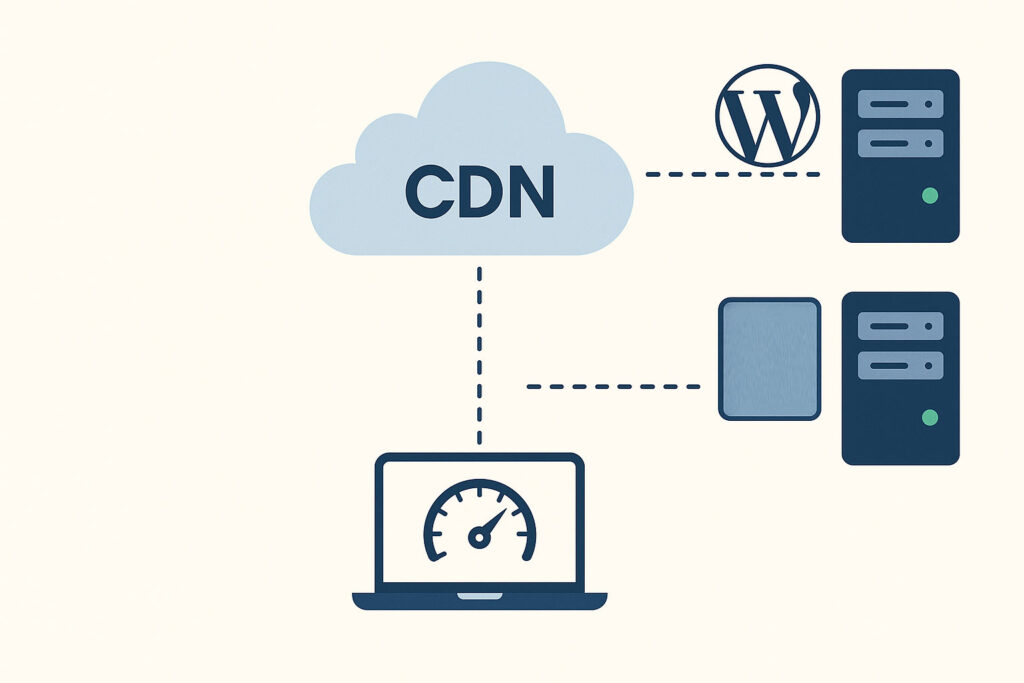
Even if HTTP/3 is only used between the browser and the edge, that’s where it matters most: the leg of the journey exposed to lossy mobile networks and long-distance latency.
Visualising HTTP/3 in Your Architecture
When explaining this to stakeholders, simple visuals help. For your article or documentation, you might illustrate HTTP/3 as the “outer layer” of a performance onion: protocol, CDN, caching, application, and database. For now, you can use a placeholder image and replace it with a custom diagram later.
What Is HTTP/3 FAQs
No. HTTP/3 operates at the transport layer, underneath HTTP semantics. Your WordPress code, theme and plugins do not need to be modified. What you do need is support at the web server and/or CDN level, plus correct TLS and network configuration.
No. Browsers that do not support HTTP/3 will simply fall back to HTTP/2 or HTTP/1.1. The server typically advertises HTTP/3 as an additional option; clients opt in if they understand it. This makes deployment relatively low risk.
No. HTTP/3 and CDNs solve different but complementary problems. HTTP/3 optimises how data is transported between the browser and edge, while a CDN optimises where your content is served from. For best results, you want both: a capable CDN and modern protocol support.
There is no universal percentage. Gains depend on your audience’s networks, device mix, and distance from your servers. On very fast, local connections you may see little difference. On congested or high-latency networks, you may see noticeably better consistency in load times and fewer extreme slow loads.
Yes. The major browsers and leading CDNs support HTTP/3 in production. The key is to adopt it through mature infrastructure rather than experimental server builds, and to monitor carefully after rollout to catch any issues with specific networks or regions.
Summary: Where HTTP/3 Fits in Your Performance Roadmap
HTTP/3 is not a silver bullet, but it is an important part of a modern performance toolkit. By shifting to QUIC over UDP, it tackles long-standing issues with TCP-based HTTP, especially for mobile and high-latency users. When combined with strong caching, a well-architected CDN layer, and a tuned WordPress backend, it helps your site feel consistently fast for more of your visitors.
If you’re planning a broader optimisation project, treat HTTP/3 as one layer in your overall hosting speed stack, and validate that your hosting and CDN choices can support it cleanly. From there, follow the checklist, monitor real-user performance, and iterate – protocol evolution is just one piece of building a genuinely fast site in 2025 and beyond.
Illustration Idea: HTTP/3 vs HTTP/2 Timeline
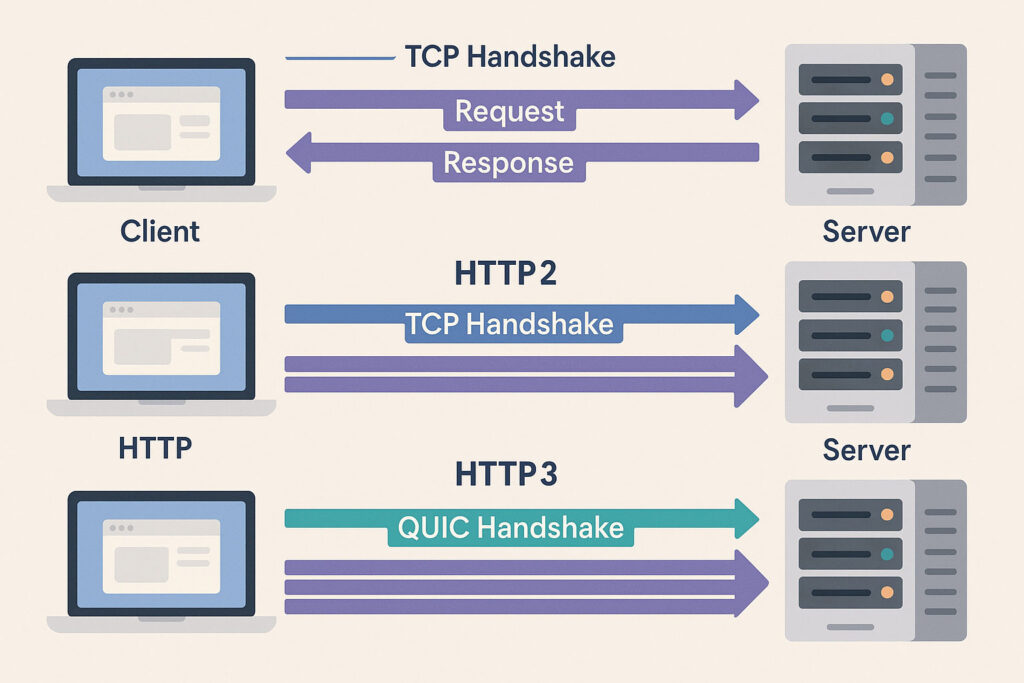
For content teams, a visual comparison can be useful. You could use a graphic showing:
- HTTP/1.1 – multiple TCP connections, no multiplexing.
- HTTP/2 – single TCP connection with multiplexing but head-of-line blocking.
- HTTP/3 – QUIC with independent streams and faster setup.
Quick HTTP/3 Readiness Checklist
- My CDN or hosting platform explicitly supports HTTP/3.
- HTTP/3 is enabled in the dashboard or server config.
- Browser DevTools show
h3as the protocol for key assets. - I’ve tested from multiple regions and networks where possible.
- RUM tools are tracking performance before and after rollout.
- Firewall rules are confirmed not to block essential UDP traffic.
- Documentation is updated so future changes don’t disable HTTP/3 accidentally.

Pros and Cons Recap
HTTP/3 Pros
- Improves performance on real-world, imperfect networks.
- Particularly beneficial for mobile and globally distributed audiences.
- Built-in encryption and modern protocol design.
- Plays well with CDN-heavy architectures.
HTTP/3 Cons
- Requires modern infrastructure and tooling to debug effectively.
- Can be impacted by legacy firewalls and corporate network rules.
- Benefits are less obvious in synthetic, low-latency tests.
- Still maturing in some server implementations, so you want stable providers.
Final Thoughts
HTTP/3 is best thought of as an upgrade to the “road” your content travels on, rather than a new engine for your site. When that road is smoother and more resilient, especially under bad conditions, your caching, image optimisation and code-level improvements can shine more consistently for your users. For teams serious about performance, it’s no longer a question of whether to adopt HTTP/3, but how to roll it out gracefully as part of your long-term infrastructure strategy.
If you found this content helpful,please consider sharing!:
More in Hosting
